- Key Takeaways
- Part 1. How to recognize bad battery symptoms
- Part 2. What causes battery damage?
- Part 3. What happens if you ignore bad battery symptoms?
- Part 4. How to fix battery health issues?
- Part 5. How to prevent battery damage (best practices)
- Part 6. FAQ: Bad battery symptoms & battery health
Batteries degrade over time. Many users only react when failure happens. Understanding battery damage symptoms early helps prevent downtime, safety risks, and costly replacements.
This guide explains how to know if your battery is going bad, what causes it, and how to fix or prevent the problem in real applications, including smartphones, laptops, and industrial devices.
Key Takeaways
- Fast draining, overheating, swelling, and shutdowns are the most common bad battery symptoms.
- Most issues are caused by aging, heat, poor charging habits, or low-quality chargers.
- A battery with health below 80% is typically considered degraded and unreliable.
- Swollen or overheating batteries are safety risks and should be replaced immediately.
- Proper charging, temperature control, and quality components can extend battery lifespan significantly.
Part 1. How to recognize bad battery symptoms
1 Battery draining quickly
If your phone battery is draining quickly or your device needs frequent charging, this is an early warning sign.
- Reduced runtime compared to normal use
- Battery drops suddenly, such as 30% to 10%
- Charging frequency increases
This usually indicates capacity loss and is one of the most common bad battery symptoms.
2 Overheating during use or charging
A failing battery often generates excess heat.
- Device feels hot under normal use
- Temperature rises during charging
- Performance slows due to thermal protection
High temperature accelerates battery damage and shortens lifespan.
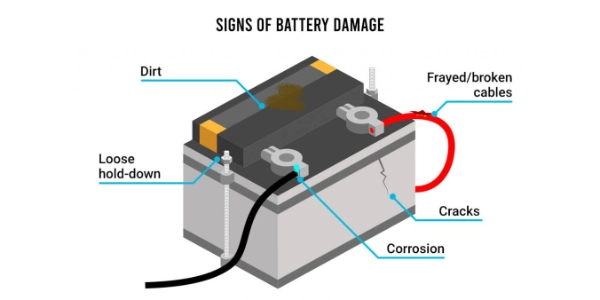
3 Swelling or bulging battery
A swollen battery is a serious issue.
- Back cover lifts or separates
- Battery pack appears expanded
- Internal pressure affects device structure
Stop using the device immediately to avoid safety risks.
4 Inconsistent performance or sudden shutdowns
Unstable batteries often cause:
- Random shutdowns even with remaining charge
- Incorrect battery percentage readings
- Device restarts under load
This is a strong sign that your battery has experienced permanent failure.
5 Charging problems
- Battery does not reach full charge
- Charging speed becomes very slow
- Charger connection is unstable
These issues may relate to both battery health and charging accessories.
Part 2. What causes battery damage?
- Natural Aging
- All batteries degrade with charge cycles. Most lithium batteries lose performance after hundreds of cycles.
- If you want to understand the basics, you can read this detailed explanation: how batteries work.
- High Temperature
- Heat is the main factor behind battery aging.
-
- Long exposure above 35°C speeds up degradation
- High temperature increases internal resistance
- According to Battery University, keeping batteries cool is one of the most effective ways to extend lifespan.
- Low-Quality Chargers
- Using poor-quality chargers can cause:
-
- Unstable voltage or current
- Overheating during charging
- Faster battery wear
- Always choose certified or compatible charging equipment.
- Overcharging and Deep Discharging
- Extreme charging habits damage battery chemistry.
-
- Keeping battery at 0% or 100% for long periods
- Frequent deep discharge cycles
- Maintaining a charge range between 20% and 80% helps reduce stress.
- Moisture Exposure
- Humidity and water can:
-
- Corrode internal components
- Increase resistance
- Reduce battery efficiency
Part 3. What happens if you ignore bad battery symptoms?
Reduced Performance
Devices powered by degraded batteries may show:
- Slower operation
- System instability
- Reduced power output
Data Loss Risks
Unexpected shutdowns can lead to:
- Unsaved data loss
- File corruption
- Workflow interruption
Safety Risks
Damaged batteries may cause:
- Overheating or fire
- Leakage
- Structural damage to devices
Immediate action is required if these symptoms appear.
Part 4. How to fix battery health issues?
- Replace the Battery
- If the battery shows swelling, fast draining, or shutdown issues, replacement is the most effective solution.
- For custom battery packs or industrial applications, you can explore custom lithium battery solutions to ensure proper compatibility.
- Improve Charging Habits
- Avoid overnight overcharging
- Keep battery between 20% and 80%
- Use high-quality chargers and cables
- Control Temperature
- Avoid direct sunlight
- Use devices in ventilated environments
- Stop usage if overheating occurs
- Monitor Battery Health
- Most devices provide battery diagnostics.
-
- Above 85% health is good
- Around 80% indicates aging
- Below 80% suggests replacement
- Understanding what battery health is bad helps you decide when to act.
- Perform Regular Maintenance
- Clean charging ports
- Check cable connections
- Keep software updated
Part 5. How to prevent battery damage (best practices)
| Practice | Benefit |
|---|---|
| Keep battery cool | Slows aging |
| Avoid deep discharge | Protects battery chemistry |
| Use certified chargers | Ensures stable charging |
| Partial charging cycles | Extends lifespan |
| Store at 50% charge | Ideal for storage |
Part 6. FAQ: Bad battery symptoms & battery health
How do I know if my battery is going bad?
Common signs include fast draining, overheating, swelling, and sudden shutdowns.
What is considered bad battery health?
Battery health below 80% is generally considered poor and may affect performance.
Can a bad battery be fixed?
Minor issues can improve with better charging habits, but degraded batteries usually need replacement.
Why is my phone battery draining quickly?
It is often caused by aging, high usage, background apps, or battery degradation.
What does battery damage mean?
Battery damage refers to chemical or physical degradation that reduces capacity, efficiency, or safety.
Related Tags:

More Articles
Buck vs. Boost vs. Buck-Boost Converter: Which Is Best for Battery?
Not sure which converter your battery-powered device needs? Compare Buck, Boost, and Buck-Boost designs and discover what affects voltage stability and runtime.
How to Match 18650 Cells for a Reliable Battery Pack?
Building an 18650 battery pack? Learn how to compare cell capacity, voltage, and internal resistance to avoid mismatches and improve reliability.
Why Do 18650 Battery Packs Get Hot During Discharge?
Is your 18650 battery pack overheating under load? Learn what causes excess heat, how to spot dangerous symptoms, and what to do next.
18650 Battery BMS: How to Get the Specs Right
Learn how to choose a BMS for an 18650 battery pack. Compare voltage, current ratings, protection features, and balancing before you buy.
Why Does My Ring Camera Battery Drain So Fast or Stop Charging?
Is your Ring camera battery draining fast or not charging? Discover common causes, practical fixes, and when to replace the battery.